We Gave the AI Better Documentation. It Got Slower.
We had 15 skill files documenting every Synthesis CLI command — syntax, options, example invocations, expected output. We wrote them carefully. We loaded them into the agent's context. We assumed the agent would use them.
Then we ran a benchmark.
The CLI condition was the worst-performing integration in the entire test. Worse than no integration at all.
That result was uncomfortable enough that we measured it three more ways to make sure it was real. It was real.
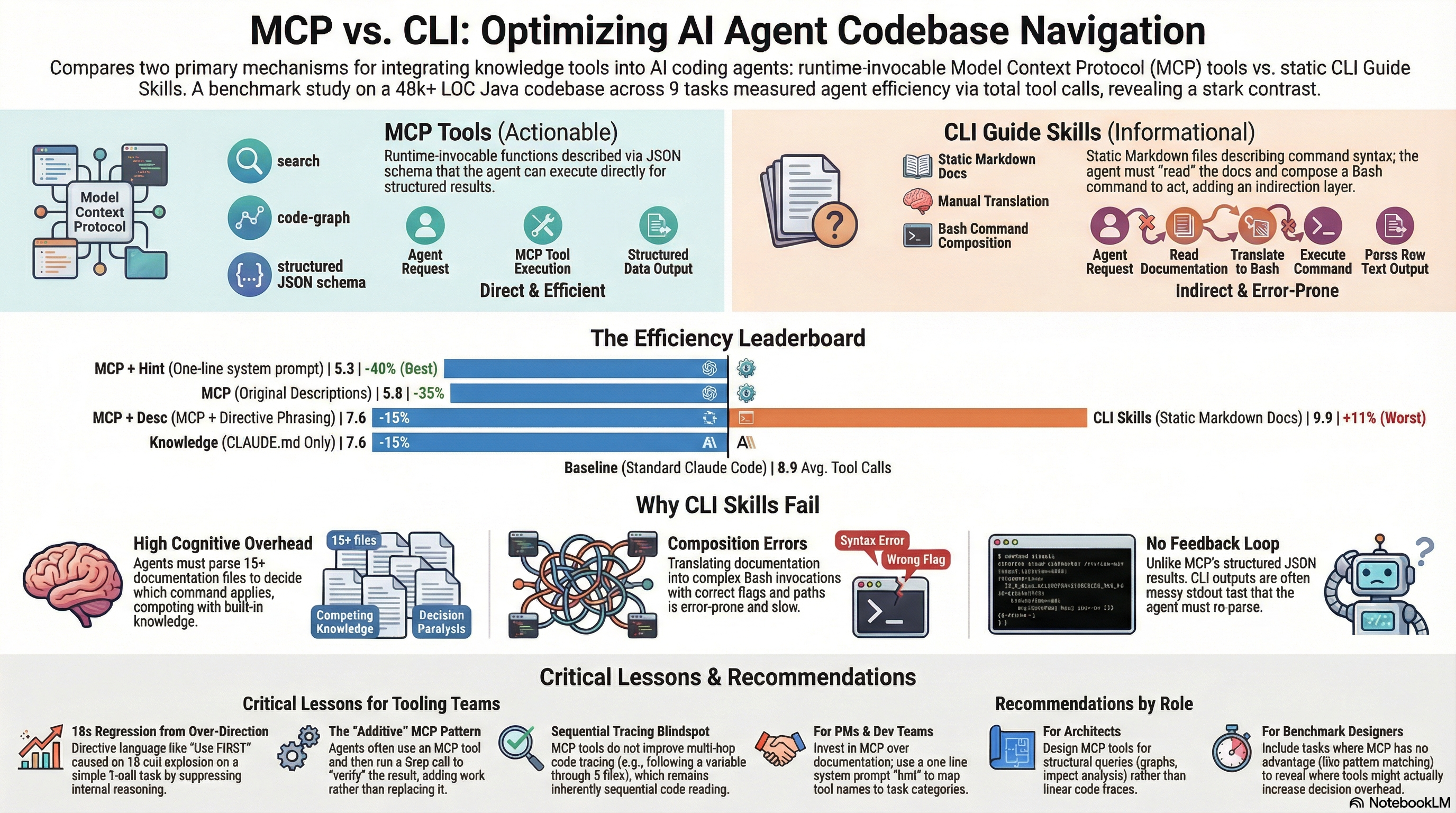
This post is about what we learned from a six-condition benchmark on 9 codebase navigation tasks — why CLI documentation backfired, why MCP tools helped, and why a single line of text in the system prompt turned out to be the most effective intervention of all.
The setup
We run Synthesis, a knowledge infrastructure tool that indexes codebases and makes them queryable in under a second. Synthesis exposes 41 tools via MCP and also ships CLI commands like synthesis search, synthesis relate, synthesis graph. The question we wanted to answer: which way of integrating Synthesis into an AI agent's workflow actually improves agent performance?
We designed 9 codebase navigation tasks against the Synthesis codebase itself (48,739 lines of Java, 2,325 tests, 25 skill files). Each task had a verified ground truth. We measured total tool calls as a proxy for efficiency — fewer tool calls means less latency, less cost, and a more focused agent.
Six conditions, each run in isolation:
| # | Condition | What the agent receives | Avg tool calls | vs Baseline |
|---|---|---|---|---|
| 1 | Baseline | Standard Claude Code, no Synthesis | 8.9 | — |
| 2 | Knowledge | CLAUDE.md + 14 knowledge skills | 7.6 | -15% |
| 3 | CLI | Knowledge + 15 CLI guide skills | 9.9 | +11% |
| 4 | MCP | Knowledge + 41 MCP tools | 5.8 | -35% |
| 5 | MCP + Hint | MCP + one-line system prompt | 5.3 | -40% |
| 6 | MCP + Descriptions | MCP + rewritten tool descriptions | 7.6 | -15% |
The ordering: MCP + Hint > MCP > Knowledge = MCP + Descriptions > Baseline > CLI.
Why CLI guide skills made things worse
The intuition behind CLI skills is sound. The agent does not know our tools, so we tell it about them. Detailed documentation. Worked examples. Correct flags and paths.
The problem is what happens when the agent reads all of this.
The agent processes 15 skill documents, understands that specialized search, graph, and relationship tools exist, and then has to decide: compose a Bash command to invoke one of these tools, or just use Grep? Grep is familiar. The output format is known. No flag composition required. No stdout parsing. The path to a correct answer is shorter.
So the agent considered the CLI tools — that deliberation cost time and context — and then chose Grep anyway.
Three compounding costs:
-
Decision overhead. The agent evaluated 15 documentation files before choosing not to use them. That evaluation is not free.
-
Composition cost. When the agent did attempt CLI invocations, it had to construct the right syntax from documentation, an error-prone process.
synthesis search --workspace /path/to/workspace --format json --query "..."has multiple parameters the model must infer correctly. -
Output parsing. MCP returns structured JSON. CLI returns formatted stdout with column headers and colours that the agent has to parse.
The result: a condition that informed the agent about better tools somehow produced an agent that worked harder than one that had never heard of those tools.
What MCP does differently
The MCP integration skipped all of that. Instead of documentation to read, the agent received a tools/list manifest describing 41 callable functions with JSON schemas. At runtime, the agent invokes a tool and receives structured data back. No Bash. No stdout parsing. No flag composition.
The efficiency gain was immediate:
| Task | Baseline | MCP (C4) | Delta |
|---|---|---|---|
| P5-R2: Module dependency graph | 32 | 10 | -69% |
| P5-A1: Lucene boost fields | 5 | 10 | — |
| P4-B1: Flyway migrations | 8 | 1 | -88% |
| B3: Cross-repo dependencies | 9 | 3 | -67% |
| E1: ROI metrics | 6 | 0 | -100% |
| Average | 8.9 | 5.8 | -35% |
The standout case was P5-R2: reconstructing the complete module dependency graph. Baseline required 32 shell commands — manually grepping through packages, parsing import statements, stitching together a picture. With MCP, the agent called code-graph twice, got the pre-computed graph, and stopped. The tool name matched the task concept directly. No additional guidance needed.
The E1 result (0 tool calls) is also worth noting. The ROI metrics were in the agent's context via CLAUDE.md. The agent answered from memory without touching any tool. That is the most efficient possible outcome. It has nothing to do with MCP — it is what happens when pre-loaded context is sufficient. We return to this in the composability discussion.
The description rewrite experiment
Condition 6 tried to improve on MCP by rewriting the tool descriptions. We added directive language: "Use this FIRST for finding relevant files." "Use INSTEAD OF Grep when finding callers." The hypothesis: clearer guidance would push the agent toward the right tool earlier.
The result was a regression to 7.6 tool calls — identical to Knowledge-only, 31% worse than baseline MCP.
The problem was the word "FIRST." The description told the agent to run search before doing anything else, even when the answer was already in context. On E1 (ROI metrics), where the MCP condition had achieved 0 calls, the rewritten description produced 4 calls: 2 searches and 2 reads. The agent searched for information it already had.
The worst case was P4-B1 (Flyway migrations). The MCP condition had achieved 1 call — a single Glob on V*.sql. The rewritten descriptions produced 18 calls: the agent, uncertain whether to use the MCP search tool or direct file listing, eventually escalated by spawning a Task subagent and reading 15 files individually.
One word. Eighteen times more work.
The lesson is precise: directive language in tool descriptions overrides the agent's ability to use pre-loaded context. "Use FIRST" is an absolute instruction. "Use INSTEAD OF Grep when discovering an unfamiliar codebase" is a conditional instruction. The difference is not stylistic — it determines whether the agent uses its knowledge or ignores it.
The one-line hint
The best result in the benchmark was the simplest intervention: a single sentence added to the system prompt.
Synthesis MCP tools are available. Prefer
searchover Grep for discovery,relateover Grep for callers/dependents,code-graphfor architecture,tracefor execution flow,impactfor change analysis.
That is five tool-to-task mappings in one line. The result: 5.3 average tool calls, -40% versus baseline.
Why does this work better than rewriting 41 tool descriptions?
The hint is a preference, not a command. The agent reads "prefer search over Grep" and keeps its existing cost model. It can still answer from context when context is sufficient (E1: 1 call to verify). It can still use Glob when Glob is faster (P4-B1: 2 calls). The hint guides without overriding.
The descriptions rewrote what each tool said about itself. The hint gave the agent a meta-signal: here is how these tools map to task types. The agent can interpolate for novel tasks. It cannot interpolate from 41 individual descriptions without cognitive overhead that consumes the efficiency gain.
One sentence of decision guidance beat 41 rewritten tool descriptions.
Per-task breakdown
The pattern varies by task type:
| Task | Baseline | MCP | MCP+Hint | MCP+Desc |
|---|---|---|---|---|
| P5-R2: Dependency graph | 32 | 10 | 5 | 3 |
| P5-A1: Lucene fields | 5 | 10 | 3 | 4 |
| P4-B1: Flyway migrations | 8 | 1 | 2 | 18 |
| B3: Cross-repo deps | 9 | 3 | 4 | 10 |
| E1: ROI metrics | 6 | 0 | 1 | 4 |
| P5-R1: SearchIndex callers | 5 | 2 | 6 | 2 |
| P4-C1: --since flow trace | 6 | 16 | 19 | 16 |
The P4-C1 result deserves attention. Every MCP condition performed worse than baseline on this task. Baseline used 6 calls (grep and follow the chain). MCP used 16. MCP + Hint used 19.
The task was tracing execution flow through a chain of method calls. This is inherently sequential: read file A, discover it calls B, read B, discover it calls C, and so on. The trace MCP tool can show the high-level call chain, but the agent still needs to read each file to understand parameter threading and branching at every hop. MCP tools do not help with sequential code comprehension. Worse, their presence added decision overhead: the agent spent extra calls deciding which tool to try before falling back to file reads.
Some tasks simply are not MCP tasks. Designing tool descriptions that acknowledge this prevents regressions.
Correctness: efficiency without sacrifice
The MCP condition scored 10.8/12 on a multi-axis correctness rubric across structural accuracy, data currency, depth, and semantic correctness. The efficiency gains did not come at the cost of answer quality.
One hallucination occurred in the E1 0-call answer: the agent reported "Feb 19" as the validation date when the actual date was Feb 17. This came from the pre-loaded context, not from any MCP tool. The next post covers that finding in depth — it turns out to have architectural implications for how we structure knowledge for agents.
What to take from this
For tooling teams integrating MCP into agent workflows:
Do not document your CLI for agents. Expose tools via MCP. The indirection from documentation to Bash invocation to stdout parsing costs more than it gives back.
Add a decision-heuristic line to the system prompt — not to the tool descriptions. Five task-to-tool mappings in one sentence produce better results than rewriting all your descriptions.
Use conditional language in descriptions: "Use INSTEAD OF Grep when you need bidirectional relationship data" rather than "Use this FIRST." Include scope guards for tools that overlap with standard capabilities.
Accept that some tasks resist MCP optimization. Sequential code tracing, simple pattern matching, and factual recall from pre-loaded context are all faster with standard tools. A 35-40% average efficiency gain with MCP is a real result — but it comes from the tasks where MCP has structural advantages, not from replacing every Grep.
For software architects:
MCP compresses structural queries — dependency graphs, impact analysis, relationship mapping — by 70-91%. It does not compress sequential code comprehension. Design MCP tools for structural queries.
For AI product managers:
One line of system prompt guidance outperformed weeks of documentation work in this benchmark. If your MCP integration is underperforming, the bottleneck is likely the agent's decision framework, not the tools themselves.
The benchmark data and full per-task results are in our benchmark data (available on request) under /benchmark/.
The next post covers what a hallucinated date — one wrong number in an otherwise correct answer — reveals about how we should structure knowledge for AI agents, and how KCP and MCP compose to address different failure modes in the same agent session.